Release the coins only after the money is visible in your own bank or wallet app, in full, from a payer whose name matches the name on the order. Not when the buyer says they’ve paid, not when you get a screenshot or a text message, and not when the name is “close enough”.
That one rule covers most of what goes wrong for first-time sellers on Binance’s P2P market. P2P means person to person: you sell USDT directly to a buyer, and the buyer pays you in local money by bank transfer or a payment app. Binance holds your USDT while the order runs and lets it go only when you press [Confirm release]. Everything below is about getting to that button with a clear head. Before your first sale, also check what your country’s rules say about selling crypto and receiving the proceeds into your bank.
Before your first sale: a payment method in your own name
Add a bank account or payment app in your own name, the same name as your verified Binance account. Binance’s help page for selling says it plainly: “Please use your own account as the payment method. It should be in the same name as your verified Binance account.”
There are two reasons this matters to you, not just to Binance. First, it’s how the name check at the end works: you compare the name on the incoming payment with the buyer’s name on the order, in your own bank app. If the money is going to a cousin’s account, you can’t see it land and you can’t check anything. Second, it keeps the money trail clean. If your bank ever asks why money arrived, you want the answer to be “I sold USDT I received for work, here’s the order”, not a story about a relative’s account.
A few things to sort out before you open any order:
- Your Binance account is verified. If it isn’t, the guide to opening and verifying a Binance account covers that first.
- Your bank or payment app is one you can open on your phone and check in real time. A statement that arrives next week doesn’t help at the release moment.
- The name on that bank account matches your verified name. If your bank abbreviates it or uses a different order, note exactly how, so a mismatch doesn’t confuse you later.
- Two-factor authentication is on. Releasing coins asks for it, or for a passkey.
- You know how much you want to sell and roughly what it’s worth. The last section shows how to work that out.
I’d also make the first sale small. Not because P2P is uniquely risky, but because the first time through any money process is when you misread a screen. A small first order lets you see every step once with little at stake.
How the P2P market works
The P2P market is a list of ads. On the Sell side, each ad is a buyer offering to buy USDT from you at a stated price, within a minimum and maximum amount, paying by the methods the ad lists. You pick an ad, open an order, and the buyer pays you directly.
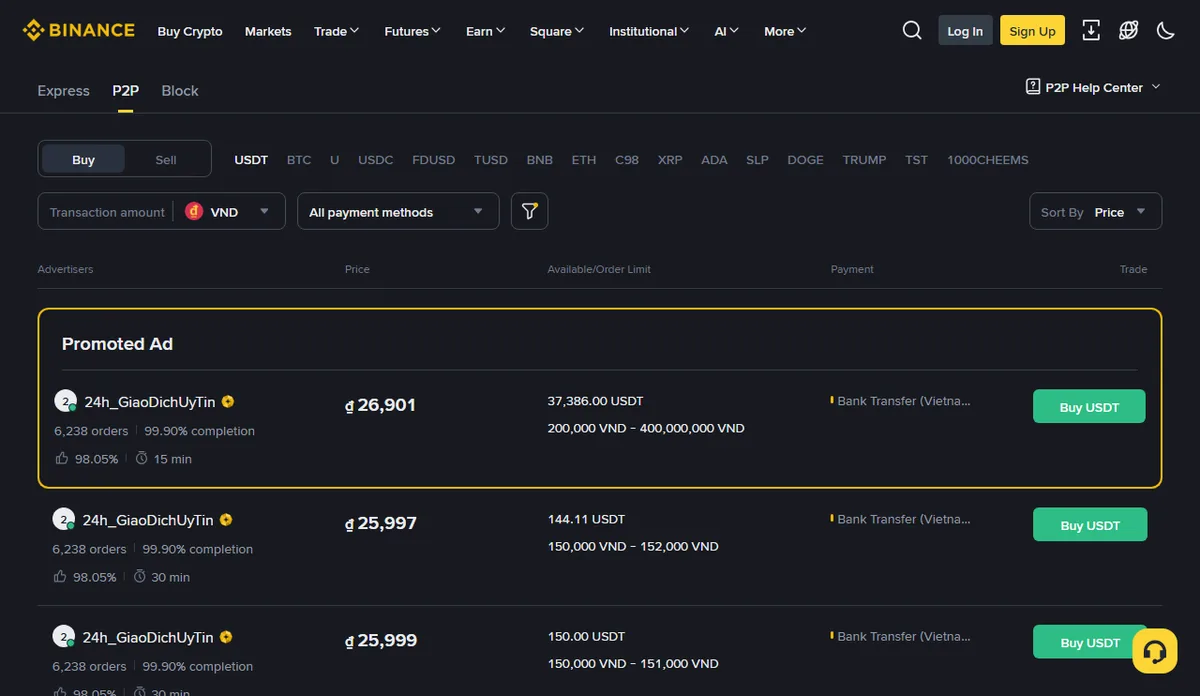
The part that protects you: when you open a sell order, the USDT you’re selling is frozen by the platform for the length of the order. It’s no longer free in your balance, but it hasn’t gone to the buyer either. It moves to the buyer only when you tap [Confirm release]. Until you do, the coins haven’t left. That’s why the release button is the moment that matters, and the only one.
The flip side is that release is final. As the US Federal Trade Commission puts it, “Cryptocurrency payments typically are not reversible.” Once you release, the USDT is the buyer’s, and getting it back depends on them.
How I’d choose a buyer’s ad:
- Pick a payment method you actually have and can check live. If the ad lists a bank you don’t use, skip it, even if the price looks better.
- Look at the buyer’s record on the ad: how many orders they’ve completed and how often they complete. A long, steady record isn’t a guarantee, but a new account with a price far above everyone else’s deserves a second look.
- Make sure your amount sits inside the ad’s limits.
- Read the buyer’s terms before you open the order. Some add conditions. If a term asks you to do something off the platform, such as contacting them on another app, choose a different ad.
- Compare the price with the ads around it. A price well above the rest of the list is more often bait than generosity.
Binance’s app also has an [Express] mode alongside the ad list. Whichever route you use, the release rule is the same.
The order, step by step
In the Binance app, the selling steps from Binance’s help page are:
- Go to [Trade] → [P2P], then the [Sell] tab.
- Choose the coin (USDT) and your local currency.
- Pick a buyer’s ad.
- Enter the amount you want to sell.
- Choose the payment method you’ll be paid by.
- Review the buyer’s terms.
- Tap [Sell USDT]. The order opens and your USDT is frozen for it.
- Wait for the buyer to pay you.
- After you’ve received the money in your own account, tap [Confirm release].
- Confirm with your two-factor code or passkey.
Between steps 7 and 9, the order screen shows the buyer’s name and a chat. Keep all conversation there. The chat is part of the order, so it’s the record you can point to if you need help.
The buyer may tell you, or mark in the order, that they’ve paid before the money reaches you. That’s a statement from the buyer, not a fact about your bank. Bank transfers between different banks can take a while, and some arrive the same minute. Either way, what you wait for is the money in your app.
Open orders only when you have time to watch them through, with your bank app on hand. An order you’re half-watching is where mistakes happen.
Where this comes from checked September 2026
The steps, button names, the own-name rule, the frozen USDT and the release checks come from Binance’s help page How to sell cryptocurrency via P2P trading on the Binance app (updated 19 December 2025). The quotes on irreversible payments and on money that turns out not to be real are from the FTC’s What To Know About Cryptocurrency and Scams. The worked example uses invented numbers.
The release moment: what to check before you tap Confirm release
Tap [Confirm release] only when three things are true: the money is in your own account, the amount is the full order amount, and the payer’s name matches the buyer’s name on the order. Check all three yourself, in your own bank or payment app, every time.
Your own app, not a message. Binance’s page says: “Always verify the payment from your receiving account.” Open your bank app or payment app yourself and look at the balance or the incoming transactions. Don’t rely on an SMS saying money arrived, an email from “your bank”, or a screenshot from the buyer. All three can be faked, and Binance warns: “Beware of any fake confirmations from the buyer.”
The full amount. Compare the amount received with the amount on the order, not with what the buyer says they sent. If it’s short, even slightly, don’t release; ask in the order chat and use the order’s help if it isn’t sorted out.
The name. The name on the incoming payment should match the buyer’s name on the order. Binance’s page lists this as a check before releasing. A payment from a different person, a company, or “a friend who’s paying for me” is exactly the case to stop at.
When your bank shows names differently, slow down. Some banking apps shorten names, drop middle names or show only initials. If you can’t tell whether the payer’s name on your statement is the buyer on the order, treat it as not matching: ask in the order chat, and use [Help] rather than guessing. A real buyer loses a few minutes; you avoid releasing to the wrong person.
Also check that it has landed, not just been sent. Some banking apps show a pending incoming transfer before it’s complete. Wait until it shows as received in your balance.
Fake confirmations come in a few familiar forms:
- A screenshot of a bank transfer with the right amount and your name on it. Screenshots can be edited in a minute.
- A text message that looks like it’s from your bank, sometimes arriving right after the buyer says “sent”. Anyone can send a text with a bank’s name.
- An email “from Binance” saying the payment is confirmed and you should release. Binance’s order screen is where order status lives; an email doesn’t change what’s in your bank.
- A message in the order chat saying the transfer is “processing” and asking you to release “to save time”.
The guide on spotting fake crypto payment proof shows more examples, most of which apply to bank-transfer proof too.
When something is off: don’t release, use the order’s help
If the payer’s name doesn’t match, if the buyer asks you to release first, or if they want to move the conversation to another chat app, don’t release. Keep the conversation in the order chat, use the order’s [Help] option, and open an appeal if the order can’t be completed normally. Your USDT stays frozen by the platform while that happens.
The situations new sellers meet most often:
The money came from a different name. The buyer says it’s their spouse, their company or a friend. Maybe it is. It doesn’t change what you do: don’t release on a payment that doesn’t match the order, and ask for help through the order. This is the situation that can leave you with no USDT and a bank asking about money that wasn’t the buyer’s to send. The FTC describes schemes where money that appeared in someone’s account turns out not to be real, and “the money will be gone, and you’ll be on the hook to repay that money to your bank.”
The buyer asks you to release first. The reasons vary: they’re in a hurry, their bank is slow, they’ve done this “hundreds of times”. There’s no version of this that’s fine. The order exists so that you don’t have to trust them.
The buyer wants to move to WhatsApp, Telegram or a phone call. Outside the order chat, there’s no record the platform can see. Stay in the order.
The buyer overpaid and asks you to send back the difference. Don’t send anything outside the order. Ask for help through the order and let the platform sort out the amount.
Someone “from Binance” joins the conversation, or contacts you separately, to say the payment is confirmed. Treat it as fake whatever it looks like, and check your bank yourself.
The buyer is rude, pushy or threatening. Pressure is a tactic. Don’t release, don’t argue, use [Help].
None of these requires you to accuse anyone. A short, calm message keeps the record clean:
Message for the order chat
I can release once the full amount shows in my own account from the name on this order. At the moment it doesn't, so I'm not able to release yet. I've asked for help through the order.
After the sale, and what it really cost you
Once you’ve released, the order is complete, and the local money in your bank is yours. Two habits are worth starting from the first sale: keep the record, and work out what the sale actually cost.
Keep the order record. Save or screenshot the completed order: the order number, amount, price, the buyer’s name, the date and the payment method. Your bank may ask about incoming transfers, especially if P2P payments from different people start arriving in your account. When that happens, the order record, plus the invoice or agreement for the work that earned you the USDT, lets you answer in plain words. Answer your bank honestly and through its own channels.
Work out the cost. The main cost of a P2P sale is usually not a listed fee; it’s the gap between the ad’s price and the market rate for your currency. Check the order screen for any fee before you confirm, and then do the price comparison yourself.
Here’s a worked example with invented round numbers:
- You sell 500 USDT.
- As a reference for what 1 USDT is worth, you use the current rate for 1 US dollar in your currency, since USDT is designed to track the dollar. In this example, 100 units of local currency.
- The buyer’s ad price is 97 per USDT.
What you receive: 500 × 97 = 48,500. At the reference rate: 500 × 100 = 50,000. The gap: 50,000 − 48,500 = 1,500. As a percentage: (100 − 97) ÷ 100 × 100 = 3%.
Now compare with another ad at 98.5: 500 × 98.5 = 49,250, which is 750 more than the first ad for the same sale. On a small first sale the difference is modest. On regular payments it adds up, which is why comparing a few ads each time is worth a minute.
The formula, so you can reuse it:
- Cost of the price gap = amount sold × (reference rate − ad price)
- Gap as a percentage = (reference rate − ad price) ÷ reference rate × 100
Remember the ad with the best price isn’t the best ad if the buyer’s record is thin or the payment method isn’t one you can check live. Choose the ad you can check with confidence, then the best price among those.
If you’re not sure you want local money yet, or want to convert only part of a payment, the guide on whether to keep USDT or convert it goes through that decision. For the next sale, the steps are the same, and so is the rule: release only when the money is in your own app.
Questions readers ask
Can I receive the buyer’s payment into a relative’s bank account?
Binance asks sellers to use their own account as the payment method, in the same name as their verified Binance account. A relative's or friend's account doesn't meet that, and it makes the name check at release time impossible. Add a bank account or payment app in your own name first.
What if the buyer paid a different amount from the order?
Don't release, and don't settle the difference privately by sending money back. Keep everything inside the order chat and use the order's Help option so the platform can sort it out. Release only when the payment matches the order in full.
Is Express mode safer or riskier than choosing an ad myself?
Binance's app offers an Express mode alongside the ad list, but the rule at the end is the same: tap Confirm release only after the full payment is visible in your own bank or wallet app from a payer whose name matches the order.
What happens if the buyer stops replying after I open an order?
Don't release anything. The USDT you are selling is held by the platform while the order is open, so it isn't with the buyer. Use the order chat and the Help option, and open an appeal if the order can't be completed normally.