Most deposits that look “held” on Binance aren’t held at all. They’re one of a few ordinary things: the blockchain is still confirming, the network was paused for maintenance, the payer used a network or memo that doesn’t match your deposit page, the amount was below the minimum, or your account isn’t fully verified. Each one looks different on screen, so the first job is to work out which you’re facing.
Two views tell you almost everything: your own Binance deposit history, opened by you, and the transaction on a block explorer, looked up with the transaction ID (TxID) the payer gives you.
| What you see | Most likely cause | Section |
|---|---|---|
| Binance shows the deposit as in progress; the explorer shows it still confirming | Confirmations not finished | Still pending |
| The explorer shows success; Binance shows nothing, or it’s been a long time | Wrong network, address or memo, below minimum, or maintenance | Confirmed but not in my balance |
| The network is marked as suspended on Binance’s status page | Deposits paused on that network | The network shows paused |
| Your account says “Withdraw Only”, or you’re asked for information | Verification not complete, or a question about the funds | Withdraw only or asked for information |
“Still pending”: the blockchain is still confirming
A deposit that shows as pending or in progress usually just needs more confirmations. A confirmation is one more block added on top of the one holding the transfer. Binance waits for a set number before it credits the coins, and that number depends on the coin and network. Its help page gives Bitcoin as an example, needing at least 2 network confirmations before crediting.
How long that takes “varies depending on the blockchain and its current network traffic,” as Binance’s deposit page puts it. For a sense of scale, TRON adds a block about every 3 seconds and Ethereum works in slots of about 12 seconds, but a busy network, or a coin that needs many confirmations, stretches that out.
What to check:
- Look the TxID up on the explorer for the network it was sent on: Tronscan for TRON, BscScan for BNB Smart Chain, Etherscan for Ethereum.
- If the explorer shows the transaction as pending or unconfirmed, the wait is on the blockchain, not at Binance. Nothing you can do on your side speeds it up.
- If the explorer shows it confirmed with a growing number of confirmations, Binance is counting. Give it time.
- If the explorer can’t find the TxID at all, the payer may have given you the wrong ID, looked on the wrong network, or not actually sent yet.
That last case matters. A payer who sends a “transfer complete” screenshot but no TxID that an explorer can find hasn’t shown you a payment. Screenshots can be made to say anything; the explorer and your own balance can’t. The guide on checking whether a crypto payment has arrived shows what each field on an explorer page means.
“Confirmed on the blockchain but not in my balance”
If the explorer shows the transfer as successful and your Binance balance hasn’t moved after a reasonable wait, one of five causes from Binance’s own checklist usually explains it.
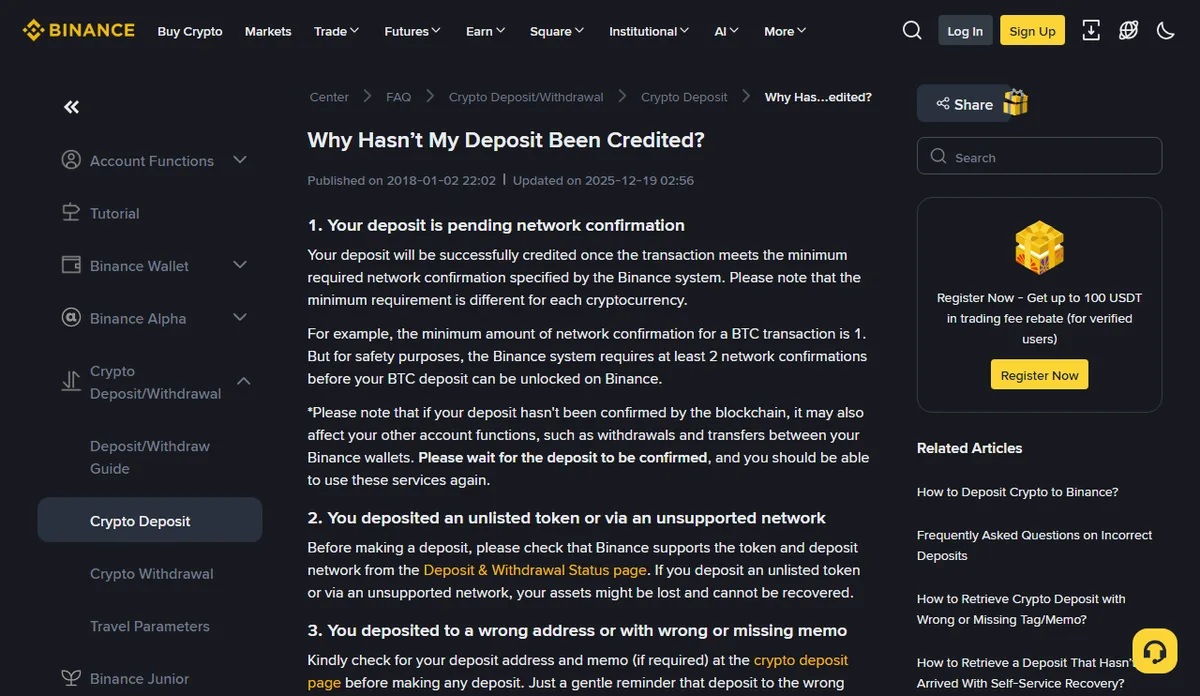
Work through them against what the explorer shows:
- Still short of the required confirmations. The explorer may say “success” after one block while Binance is waiting for more. Check again later before assuming anything else.
- An unlisted token or an unsupported network. If the payer sent a token Binance doesn’t list, or used a network your deposit page didn’t offer for that coin, Binance warns the funds may be lost. Compare the network on the explorer with the one you gave.
- A wrong address, or a wrong or missing memo. Compare the “to” address on the explorer with your deposit page, character by character at the start and end. If your deposit page showed a memo or tag field and the payer left it out or got it wrong, Binance lists that as a reason the deposit isn’t credited.
- Below the minimum deposit. Your deposit page shows a minimum for that coin and network. Binance says amounts below it are not credited. Small test payments are the ones most likely to fall under it.
- Wallet maintenance. Binance sometimes suspends deposits on a network temporarily. The next section covers how to see that.
One more cause isn’t on Binance’s list but is worth ruling out first because it takes ten seconds: looking in the wrong wallet. The deposit page can send incoming coins to Spot or to Funding. If you picked Funding and you’re looking at Spot, the money is there and you’re simply not seeing it. Check both before you write to anyone.
If none of these fits, contact Binance support from inside the app or the website you opened yourself. Binance’s page mentions 24/7 chat support. Have these ready so the first message does the work:
What to send Binance support
My deposit has not been credited.
Coin and network: [for example USDT on TRON]
Amount: [amount]
Time sent: [date and time, with time zone]
TxID: [paste the transaction ID]
Deposit address on my account: [paste it]
The explorer shows the transaction as successful.
While you wait, tell the payer what you’re doing, and ask them not to send again.
Holding message for the payer
Thanks for sending. The transfer shows on the blockchain but hasn't reached my balance yet, so I've contacted Binance support with the transaction ID. Please don't send again until I confirm. I'll update you as soon as I hear back.
The reason not to resend is simple. A second transfer on the same mistaken route just doubles the problem. If the network or memo was wrong, fix the instructions first, so the next payment goes where it should.
And ignore anyone who contacts you offering to “recover” the deposit. People who post about stuck deposits in public groups often hear from fake support within minutes. The fix, if there is one, comes from Binance through its own help chat.
“The network shows paused”
If deposits on a network are suspended, Binance’s Deposit & Withdrawal Status page shows it. That’s the page to open before you tell a payer which network to use, and the first place to look when a deposit on a network that normally works goes quiet.
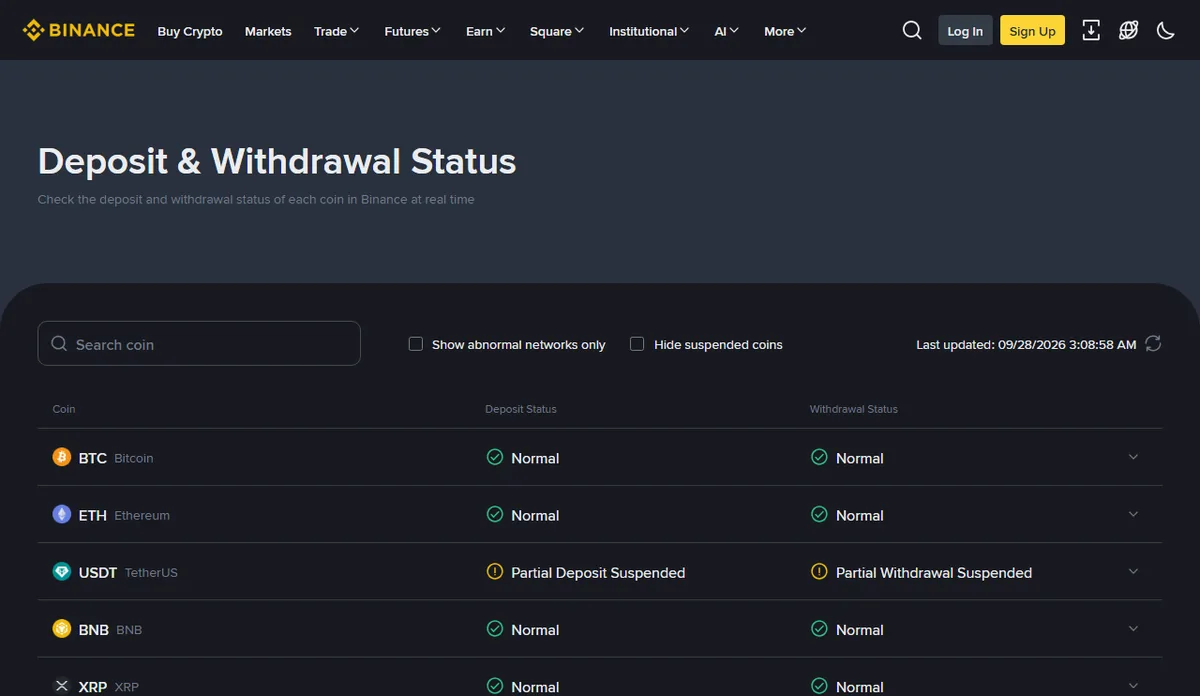
A pause is usually temporary: Binance lists wallet maintenance as one of the reasons a deposit isn’t credited, with deposits suspended for a while. What to do depends on timing.
Before the payer sends: agree on another network you both have, get the address shown for that network on your deposit page, and send the new address and network together. Don’t let them send on the paused network and hope.
After the payer sent: get the TxID, check the explorer, and wait for the status page to show the network working again. If the deposit still isn’t credited after that, contact support with the details above.
The status on the page changes from day to day, and it isn’t the same for every coin on a network. Check the coin you’re receiving, on the network you gave, on the day you need it.
Where this comes from checked September 2026
This guide relies on Binance’s help page Why hasn’t my deposit been credited (updated 19 December 2025), its Deposit & Withdrawal Status page, its identity verification guide (updated 5 June 2026), and its deposit guide for the note on confirmation times. The deposit help page doesn’t describe compliance reviews; the advice on answering questions about your funds is our own general guidance, not a Binance procedure.
“Withdraw only” or asked for information
If your account shows “Withdraw Only”, verification isn’t finished. Binance’s identity verification page says existing unverified users are restricted to “Withdraw Only”, and that becoming verified is what allows crypto deposits, trades and products. An unverified account isn’t a place to receive money. Complete verification, then give out addresses. The guide to opening and verifying a Binance account to get paid walks through it, including what to do if verification is rejected.
There’s no shortcut here, and nobody legitimate offers one. Don’t let anyone verify “for you”, don’t borrow a relative’s verified account to receive money, and don’t pay anyone who promises to lift a restriction.
Being asked about where money came from is a different situation. Binance’s deposit help page doesn’t describe this, so what follows is my advice, not Binance’s stated process. If Binance asks you, inside its own app or website, to explain a deposit, treat it as a normal question with a paper answer.
- Answer only through Binance’s own support or the request shown inside your account, reached by opening the app or site yourself.
- Keep the documents that show what the money was for: the invoice you sent, the contract or order, and the messages where the payer agreed to pay. If you invoice clients, the guide on invoicing a client in USDT shows what a clear invoice includes.
- Describe the payment in plain words: who paid you, for what, when, and how you were paid. Match the amounts to the documents.
- Tell the truth, including when a payment came from someone you haven’t met. Invented explanations make things worse, not better.
- Never send ID documents, invoices or screenshots to someone who contacts you first, by email, phone or chat, claiming to be Binance or “compliance”. Real requests are visible when you log in yourself.
If a payer asks you to receive money for them, pass it on, or explain it with a story they give you, stop. That’s how money-mule scams work, and you’re the one left answering for money that was never yours. The guide on spotting fake crypto payment proof covers the tricks that usually come with it.
The habit that makes any future question easy is boring: for every payment, keep the invoice, the agreement and the TxID in one folder. Start it with the next deposit.