Do you need an invoice if the client pays in crypto? In most cases yes, and for the same reasons as with a bank transfer: your client needs it for their accounts, you need it for yours, and it is the only document that ties a transfer on a blockchain to the work it paid for. A USDT payment on its own shows an amount moving between two addresses. It says nothing about who you are, what you did or what was agreed.
So what changes when the payment is in USDT? The invoice looks like any other invoice, with three additions: a line saying which currency the price is in and how it converts to USDT, a payment block that names the coin, the network and your address, and a fee line saying who covers the transfer cost. Those three lines prevent most of the problems people run into with crypto invoices. The rest of this guide goes through each one, then gives you a plain-text template to copy.
What a USDT invoice must include
A USDT invoice needs everything an ordinary invoice has (who, what, how much, when) plus the details that make a crypto payment land in the right place. Here is the full list, with why each field is there:
| Field | Why it matters | Example |
|---|---|---|
| Invoice number | Lets both sides refer to one payment without confusion, and keeps your records in order | INV-014 |
| Issue date and due date | Sets when payment is expected, and matters for your tax records | Issued 1 Oct 2026, due 15 Oct 2026 |
| Your name and contact | Shows who is being paid; many clients can’t book an invoice without it | Your full name or business name, email, address if needed |
| Client name and contact | Shows who owes the money | Client company name, contact person, address |
| Description of work | Links the payment to what you delivered | “Website design, 5 pages” |
| Quantity, rate and amount per line | Makes the total checkable | 1 × 800 USD = 800 USD |
| Total and currency of the price | The amount owed, in the currency you priced in | Total: 1,200 USD |
| Rate clause | Says how the price converts into USDT | “Payable in USDT, 1 USDT counted as 1 USD” |
| Coin and network | Stops the client sending the wrong token or on the wrong blockchain | USDT on TRON (TRC20) |
| Your deposit address | Where the payment goes; must be pasted from your deposit page | Full address, on its own line |
| Memo, if your deposit page shows one | Some deposits can’t be matched to your account without it | Only if a memo field appears |
| Fee clause | Decides whether the full amount must arrive | “Fees paid by sender; the full amount must arrive” |
| Payment reference | Helps you match the transfer to this invoice | “Please mention INV-014 in your message when you pay” |
| Tax lines, if they apply to you | Some people must show a tax number or charge a tax | Ask a local accountant |
| Notes | Test payment request, late or short payment terms | “Please send a small test first” |
Tax lines: ask a local accountant
Whether you must show a tax number, charge sales tax or VAT, or add any legal wording depends on where you live, where your client is, and what kind of work it is. We don’t give tax advice, and the rules on crypto income differ from country to country. A local accountant can tell you in one conversation what your invoices need to show; bring an example invoice and ask. The one general point is that being paid in USDT usually doesn’t remove any obligation you would have if the same client paid you by bank transfer, so don’t design your invoices on the assumption that it does.
Price in USD, or price in USDT?
I’d price in US dollars and let USDT be only the payment method. The invoice then says “Total: 1,200 USD, payable as 1,200 USDT”, and the amount owed doesn’t depend on the token. You have two other options, and each has a place, but this one causes the fewest arguments.
Here is how the three compare:
- Price in USD, pay in USDT (my preference). The contract is in dollars. USDT is how the dollars travel. If the client later needs to pay by bank transfer, or if USDT briefly trades slightly away from one dollar, the debt is still 1,200 USD and nobody has to renegotiate. Your invoice matches the way most clients budget, which is in a normal currency.
- Price in USDT. The invoice says “Total: 1,200 USDT”. This is simple and fine for clients who hold USDT and think in it, and for small or repeated jobs. The downside is that the contract now depends on the token. If you ever switch payment methods, you need to agree a conversion then.
- Price in your local currency, pay in USDT. Some clients prefer this, especially local ones. It only works with a clear rate clause, because the rate between your currency and USDT moves, and the two of you will look at different rates on different days.
The rate clause
Whichever you choose, write down how the price becomes a USDT amount. The shortest clause for a USD price is:
Amounts are in US dollars. Payable in USDT, with 1 USDT counted as 1 USD.
If you price in local currency, name the rate source and the moment the rate is taken:
Price: [amount] [local currency]. Payable in USDT at the [local currency]/USDT rate shown on [named rate source] on the invoice date. The USDT amount due is [amount] USDT.
Fixing the rate on the invoice date, and writing the resulting USDT amount on the invoice, is simpler than fixing it on the payment date, because the client then knows exactly what to send. If the payment comes much later than agreed, you can say in the notes that the USDT amount will be recalculated for payments after the due date. Keep the rate source neutral and checkable, something both sides can open.
Payment details, the fee clause and what happens if it arrives short or late
The payment block is the part of the invoice that decides where the money goes, so it should be complete, unambiguous and copied, not typed. Put it in its own box or section with one item per line:
- Coin: USDT
- Network: TRON (TRC20). Write both names; different platforms label the same network differently, such as “BNB Smart Chain” and “BEP20”.
- Address: pasted from your deposit page for that exact coin and network. After pasting, compare the first and last four characters with the page.
- Memo: only if your deposit page shows a memo field for that coin and network. USDT on the common networks normally doesn’t use one; if yours doesn’t, leave the line out.
This matters more with crypto than with a bank transfer, because a wrong payment usually can’t be reversed. As the US Federal Trade Commission puts it, crypto payments typically are not reversible, and you can usually only get your money back if the person you paid sends it back. If the address or network on your invoice is wrong, there is nobody to call. The same care applies if the client says the address on your invoice differs from one they received elsewhere: stop, and resend it yourself from your deposit page through the channel you normally use with them. A changed address in an email thread can be a slip or an attempt to redirect your payment.
How to write the rest of the payment message, including the wording for network names, is covered in what to send the person paying you.
The fee clause
Say whether the full amount must arrive. Many exchanges take their withdrawal fee out of the amount the sender enters unless they add it on top, so without a fee clause an invoice for 1,200 USDT can be paid with 1,200 entered and 1,199 received. The clause I’d use:
Transfer and withdrawal fees are paid by the sender. The full invoice amount must arrive.
If you prefer to absorb fees for a particular client, say that instead: “Fees are deducted from the payment”. Either is fine, as long as it is written before the client pays. The mechanics, with a worked example, are in who pays the fee when someone sends you crypto.
Due date, short payments and late payments
Give a date, not “on completion” or “ASAP”. A due date gives you a clear day to send a reminder and a clear point from which a rate clause might need recalculating.
Then add one or two lines for the cases that do happen:
- Short payment: “If less than the invoice amount arrives, the difference remains due and can be sent separately or added to the next invoice.” This turns a 1 USDT shortfall into a note, not a dispute.
- Late payment: “Payment is due by [date]. For payments after that date, the USDT amount will be recalculated at the rate on the payment day.” That line matters mainly if you price in local currency. If you want a late fee, it has to be stated in advance, and many freelancers decide it isn’t worth the friction with a good client.
- First payment: “As this is the first payment to this address, please send a small test amount first and wait for my confirmation.” Include it for every new client. It costs one extra fee and removes the risk of the whole amount going astray.
A plain-text invoice template you can copy
This template works in an email body, a chat message or a document. Replace the brackets, delete lines that don’t apply, and save a PDF copy for your records. The line items and totals are an example with invented numbers: 800 + 250 + 150 = 1,200 USD.
Plain-text invoice template
INVOICE [INV-014]

Issue date: [1 October 2026]
Due date: [15 October 2026]

From:
[Your full name or business name]
[Your address, if you include one]
[Your email]
[Tax number, only if your accountant says you need one]

Bill to:
[Client company name]
[Contact person]
[Client address]

Work:
1. [Website design, 5 pages]      1 x 800 USD   = 800 USD
2. [Logo files]                   1 x 250 USD   = 250 USD
3. [Extra revisions, hours]       3 x 50 USD    = 150 USD

Total due: 1,200 USD
[Tax line, only if it applies to you]

Payment:
Amounts are in US dollars. Payable in USDT, with 1 USDT counted as 1 USD.
Amount to send: 1,200 USDT

Coin: USDT
Network: TRON (TRC20). Please send on this network only.
Address: [paste from your deposit page]
Memo: [only if your deposit page shows a memo field; otherwise delete this line]

Fees: Transfer and withdrawal fees are paid by the sender. The full 1,200 USDT must arrive.
First payment: please send a small test amount first and wait for my confirmation before sending the rest.
Reference: please mention [INV-014] when you send the payment.

Short or late payment: any shortfall remains due and can be sent separately or added to the next invoice.

Thank you for your business.
A few notes on the template. The “Amount to send” line repeats the total in USDT so the client doesn’t have to do any conversion. The network line says “this network only” because that single line prevents the most expensive mistake. And if your client’s platform can’t send on TRON, change the network line and paste the matching address from your deposit page; never change one without the other.
Sending the invoice, and marking it paid with the TXID
Send the invoice as a PDF attachment, and put the payment block in the body of the message as well, so the client can copy the address from text rather than from a PDF. Use the email thread or chat you already use with the client, and send the invoice from the same account each time. If the client uses an accounts team, ask who should receive invoices before you send the first one.
A short covering message is enough:
Message to send with the invoice
Hi [name],

Please find attached invoice [INV-014] for [project], total 1,200 USD, payable as 1,200 USDT on TRON (TRC20). The payment details are also below so you can copy them directly:

Coin: USDT
Network: TRON (TRC20)
Address: [paste from your deposit page]

As it's our first payment, could you send a small test first? I'll confirm as soon as it arrives, and then the rest can follow to the same address. Fees are on the sender's side, so the full 1,200 USDT should arrive.

Thanks,
[Your name]
When the client says they’ve paid, check your own account’s deposit history rather than a screenshot or a link they send. The payment counts when it is credited in your account; checking whether a crypto payment has really arrived explains the statuses you will see.
Mark it paid, with the transaction ID
Once the payment is credited, update your copy of the invoice. Add a “Paid” note with:
- the date the payment was credited,
- the amount received (and the test amount, if there was one),
- the network,
- the transaction ID (TXID, also called the hash) from your deposit history, one per transfer.
For example: “Paid 3 Oct 2026. Received 20 USDT (test) + 1,180 USDT on TRON (TRC20). TXIDs: [first TXID], [second TXID].” That is 20 + 1,180 = 1,200, matching the invoice.
Keep the paid invoice with your other records, in the same folder as the proof of what you did with the USDT afterwards: the conversion order, and the bank statement line showing the local money arriving. The TXID is the most useful single item in that folder. Anyone can look it up on a public block explorer years later and see the transfer, without logging into anything, which makes the invoice and the blockchain record easy to match if an accountant, a bank or the client asks.
If the client wants a receipt, send the paid version back to them. Many clients need it to close the invoice on their side.
Where this comes from checked September 2026
This guide is based on ordinary invoicing practice plus how stablecoin transfers work on public blockchains, not on any single platform’s rules. The point that crypto payments usually can’t be reversed comes from the FTC’s What To Know About Cryptocurrency and Scams. The invoice figures are an invented example.
Making the same invoice with the free invoice maker
If you’d rather not format it yourself, the free USDT invoice maker builds the same kind of invoice in your browser. You fill in your name, the client, the invoice number and dates, and one line per piece of work with a quantity and unit price; the total adds itself up. You then choose USDT or USDC and a payment route (a deposit address on TRON, BNB Smart Chain, Ethereum or Solana, or an exchange Pay ID if both sides use the same exchange), paste your address, and pick who covers the network fee. It gives you a printable invoice or PDF, and a plain-text payment message you can paste into email or chat.
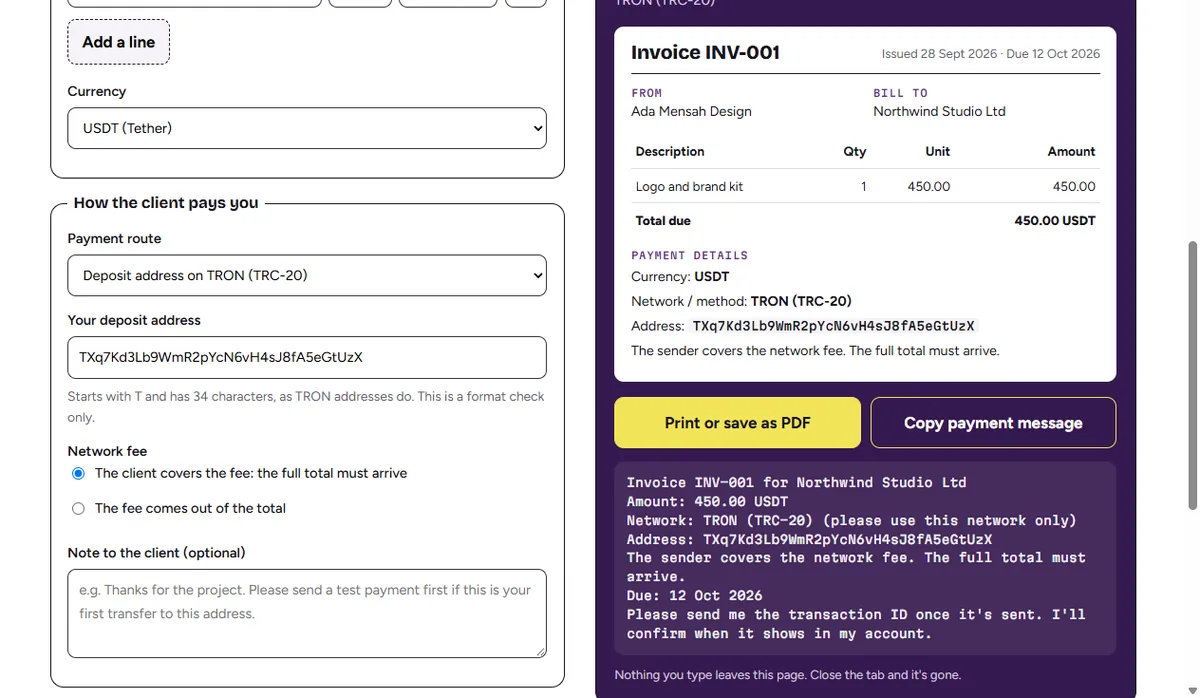
Two things to know when using it. The tool shows the invoice total in the coin you choose, so if you price in dollars, add the rate clause (“Amounts are in US dollars, 1 USDT counted as 1 USD”) in the note field. It also has no memo field or tax lines, so if your deposit page shows a memo, or your accountant says you need a tax number, add those in the note or on the saved PDF. Nothing is stored; save the PDF before you close the tab, and mark it paid with the TXID in your own copy once the money is in.