You can accept it. But agree three things in writing first: what currency the amount is really in (and at what moment it’s converted to BTC), which network the Bitcoin travels on, and the point at which you treat the payment as received. With USDT, two of those questions barely come up. With Bitcoin, skipping any one of them is how a correct-looking payment turns into an argument.
The first step is to answer the client with a question rather than an address: “Happy to take Bitcoin. Shall we keep the invoice in dollars and convert at the moment you send?” Everything below follows from that one choice.
The amount: an invoice in BTC and an invoice in dollars are different deals
A dollar stablecoin is built to stay near one dollar, so “600 USDT” and “600 dollars” end up meaning roughly the same thing. Bitcoin has no such anchor. Its price can move noticeably between the day you send the invoice and the hour the client presses send, and again between arrival and the moment you sell.
That leaves three ways to write the amount, and each puts the risk on someone different.
Price it in dollars (or your own currency) and convert when they send. The invoice says 600 USD, payable in BTC at the rate on a named source at the time of sending. The client carries the price movement up to the moment they pay; you carry it from arrival onwards. Name the source in the agreement, for example the BTC/USDT price on the exchange you’ll sell on, so nobody picks a convenient number afterwards.
Price it in BTC. The invoice says a fixed amount of BTC. Simple to pay and impossible to dispute, but if the price falls before you convert, you absorb it. That suits you only if you intend to hold Bitcoin anyway, which is a separate decision from getting paid; keeping a payment or converting it covers that trade-off for stablecoins, and the same questions apply with more force here.
Ask for USDT after all. Nothing rude about it. “Bitcoin is fine, but a dollar stablecoin saves us both the rate question” is a reasonable reply, and the USDT invoicing guide has a template ready.
Whichever you choose, add one sentence for the case where the amount that lands doesn’t match: “If the BTC received is worth less than the invoice at the agreed rate, the difference is paid as a top-up.” Without it, a short payment caused by price movement or by fees deducted on the client’s side becomes your loss by default. Fees deserve their own line too; who pays the transfer fee has the wording.
The network: “send Bitcoin” isn’t a complete instruction
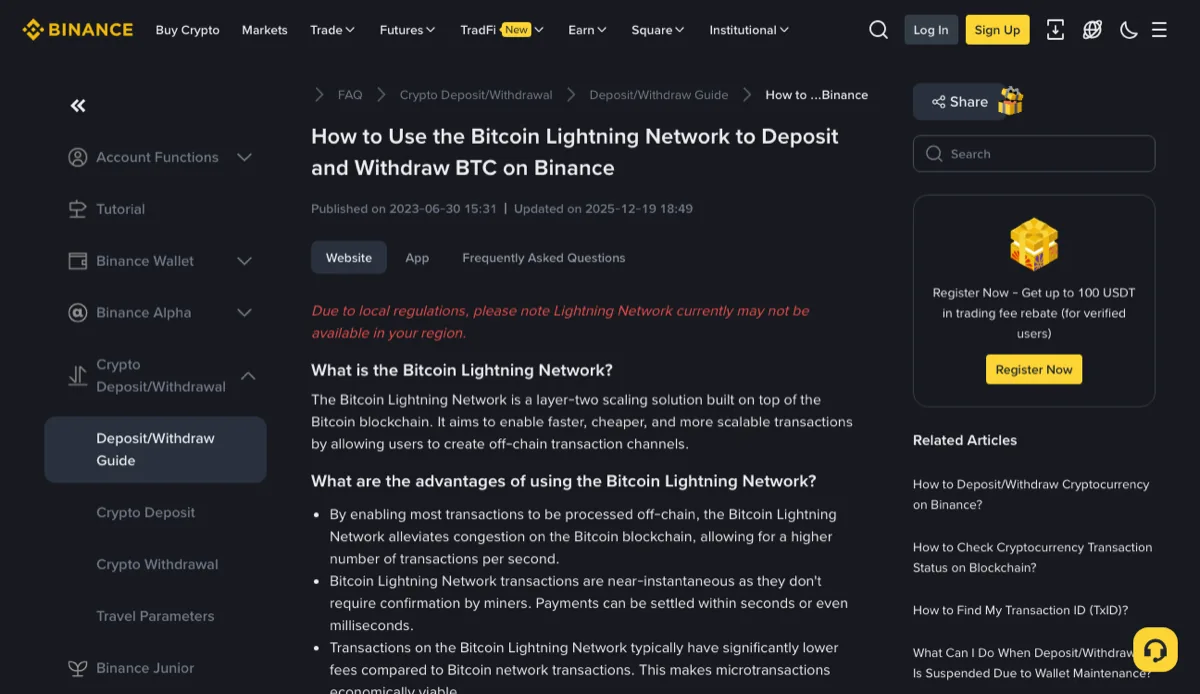
On an exchange, choosing BTC on the deposit page is only half the choice. Binance’s Lightning help page describes the next screen plainly: after you pick BTC, “you will see the available networks for depositing BTC.” Each network has its own deposit details, and the same help page warns that selecting the wrong network can mean the assets are “permanently lost”.
For a client payment there are two realistic options.
The Bitcoin network itself (on-chain). You copy a Bitcoin address from your deposit page and send it, together with the words “Bitcoin network”. This is what most wallets and exchanges mean by sending BTC, and it works for any amount the client is likely to send. It’s slower than USDT on TRON and the network fee is paid in BTC, so agree who covers it.
The Lightning Network. Faster and usually cheaper, but it works differently enough that it needs its own section below. Use it only if the client says, before anything else, that their wallet or exchange can pay a Lightning invoice.
If your deposit page lists other networks for BTC, treat them as off-limits unless the client names that exact network first. A Bitcoin-branded token on a different chain only arrives if both sides pick the same one.
Give the network name and the address in the same message, copied from your own deposit page, never retyped. What to send your payer explains why the two always travel together.
Lightning: the invoice expires while you wait
A Lightning deposit doesn’t start with a reusable address. On Binance you go to [Deposit] → [Deposit Crypto], choose BTC, choose [Lightning], type the amount, and press [Create Invoice]. The help page adds that you can’t create the invoice without entering an amount, and that the invoice expires in 30 minutes. The client then pastes that invoice into their own wallet, and on their side the amount has to match the invoice.
In practice that changes the order of things:
- The client tells you they’re ready to pay now.
- You create the invoice for the agreed amount, at that moment, and send it straight away.
- They pay within the half hour. If they miss it, you make a new one; an expired invoice is useless, so never let a client “save it for later”.
Two more limits from the same page. Lightning deposits and withdrawals have limits, which Binance says are shown on the deposit or withdrawal page when you enter an amount, because each payment channel has a maximum capacity; a large invoice may simply not be allowed. And the page opens with a red notice that, due to local regulations, Lightning “may not be available in your region”. If you don’t see the option, use the on-chain route instead.
When the payment counts as received
For an on-chain payment, the moment that matters is when the deposit shows as completed in your own history, not when the client says “sent”. Binance’s page on uncredited deposits gives Bitcoin as its example: the network minimum is one confirmation, but Binance “requires at least 2 network confirmations” before a BTC deposit is unlocked. Bitcoin blocks come slower than on the networks most USDT travels on, so tell the client up front that you’ll confirm once it’s credited, which can take a while.
Ask for the transaction ID once they’ve sent it, and check it on a block explorer yourself. Checking a payment with its TXID walks through what each field on the transaction page tells you.
Lightning is quicker: Binance describes Lightning payments as not needing confirmation by miners, and says funds are typically credited shortly after the deposit request is confirmed. There’s no on-chain TXID to look up. If a Lightning deposit hasn’t arrived, the help page’s self-service recovery asks for the payment hash, which it says you can find by decoding the invoice, plus the invoice itself and the amount on it. So keep the invoice text until the money shows in your account.
Where these details come from checked November 2026
The deposit steps, the 30-minute expiry, the limits, the regional notice and the recovery fields are from Binance’s help page How to Use the Bitcoin Lightning Network to Deposit and Withdraw BTC on Binance. The confirmation numbers for BTC are from Why Hasn’t My Deposit Been Credited?. Both pages were opened and read on 14 November 2026. Other exchanges and wallets set their own confirmation counts and Lightning rules.
A message you can send the client
Adjust the brackets and delete the Lightning line if you’re using an on-chain address.
Agreeing a Bitcoin payment
Hi [name], Bitcoin works for me. To keep it simple:
- Amount: [600 USD], paid in BTC at the BTC/USDT price on [exchange] at the time you send. If what arrives is worth less than that, please send the difference.
- Network: Bitcoin network only, to this address: [paste from your deposit page]. Please don't use any other network.
- Fees: on your side, so the full amount arrives.
- (Lightning instead: tell me when you're ready and I'll send a Lightning invoice. It expires after 30 minutes, so it's best to pay right away.)
- Once it's sent, please share the transaction ID. I'll confirm as soon as it's credited.
If it arrives short, or too much
Short is the common case, and it’s usually not bad faith: the price moved, or a withdrawal fee came out of the amount on the client’s side. Work it out against the rule you agreed, show the client the arithmetic with the rate source and time, and ask for the top-up. That conversation is short when the rule exists and long when it doesn’t.
Too much is the case to slow down for. Check that the extra amount is actually in your balance before replying, and if a refund is owed, send it to an address the client gives you as text, never to the “from” address on the explorer. Refunding a client properly has the full sequence, and fake payment proof covers the overpayment trick that starts exactly this way.